Early Departure
Report Parameters
|
Field |
Description |
|---|---|
|
Start Date |
The start date from when the report must be generated. |
|
End Date |
The end date until when the report must be generated |
|
Building Codes |
Sorts the report by the building code. Users can select multiple or all the building codes from the list to be displayed in the report generated. |
|
Sort Options |
Available options include the following:
|
|
Other Report Options |
Available options include the following:
|
Sample Report
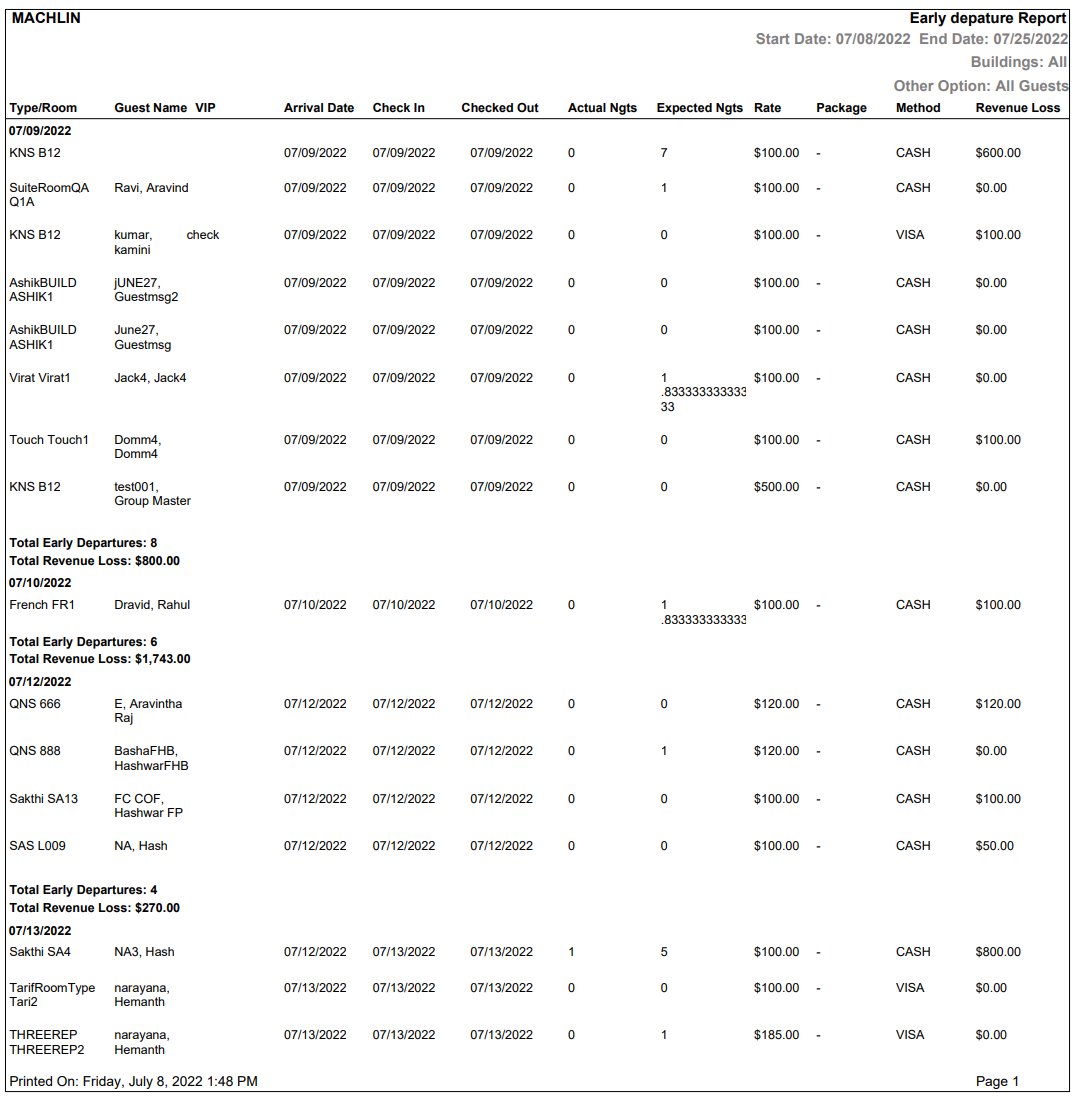
Report Fields
|
Field |
Description |
|---|---|
|
Type/Room |
The room type and room number assigned for the reservation. |
|
Guest Name |
The name of the guest. |
|
VIP |
The VIP status of the guest. |
|
Arrival Date |
The guest arrival date. |
|
Check In |
The guest check-in date. |
|
Checked Out |
The guest check-out date. |
|
Actual Nights |
The actual number of nights spent by the guest at the property. |
|
Expected Nights |
The number of nights booked by the guest. |
|
Rate |
The tariff/rate set for the reservation. |
|
Package |
The package attached to the reservation. |
|
Method |
The payment method used by the guest to settle the folio balances. |
|
Revenue Loss |
The revenue loss to the property because of the early departure. |